TESTFLIGHT BETA
PRIVATE BETA · INVITE ONLY
You're invited to try the new Slate.
We've rebuilt the Slate iOS app around a new multi-track timeline editor. Before it ships to the App Store, we're inviting a small group of teams to try the beta on TestFlight.
Join the Slate beta on TestFlight
Open this link on your iPhone. It installs the beta through TestFlight.
TestFlight link coming soon
We'll send your invite link the moment the beta is ready.
THE BIG CHANGE
A real multi-track timeline, built for iOS.
Video, text, captions and audio each live on their own track. Trim, move and layer everything directly on the timeline, and every element gets its own controls right where you select it.
EARLY ACCESS
You'll be among the first
This is the new Slate before anyone else gets it. It's a chance to get comfortable with the new layout before it ships. What you run into in these first weeks shapes what ships to everyone.
Multi-track timeline
Arrange clips, text, captions and audio on separate tracks. Trim and reorder directly on the timeline.
Inline text editing
Type and style text directly on the canvas, with controls that follow what you've selected.
Redesigned captions
A cleaner captions experience with restyled controls, living on its own timeline track.
Layouts, overlays & templates in the timeline
Layouts, overlays and templates now live on the timeline as elements you can trim, move and layer like everything else.
Image mode with layer panel
Build graphics in a dedicated image mode, with a layer panel to select, reorder and manage every element.
All-new visual design & improved UX
A fresh look across the whole app: cleaner controls, easier to find what you need, and editing that feels faster end to end.
GET READY
Three steps, only one you can do today
01 · DO THIS NOW
Download TestFlight on your iPhone
TestFlight is Apple's free app for beta testing, and the Slate beta installs through it. It has to be on the same iPhone you'll edit on, so if you're reading this on a computer, grab your phone.
On your iPhone? Tap here
or search “TestFlight” in the App Store
SCAN WITH iPHONE CAMERA
Point your camera at the code to open TestFlight in the App Store.
02
Wait for your invite link
We'll let you know the moment the beta is available, by email or Slack from your Slate contact. When it is, all you need to do is tap the button at the top of this page.
Join the Slate beta on TestFlight
TestFlight link coming soon
03
Open the link on your iPhone & tap Install
Open the invite link on the same iPhone with TestFlight on it. It opens in TestFlight. Tap Accept, then Install, and the beta installs as an update to the Slate app already on your phone. Open Slate and start editing.
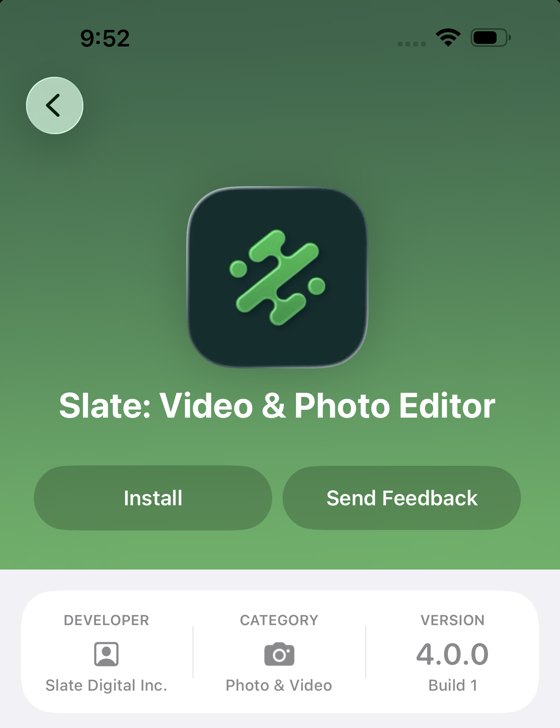
WHAT YOU'LL SEE IN TESTFLIGHT
This is beta software
The beta is an early version of the new app. Some things may be unstable, change without notice, or crash. Projects you create in the beta may be lost, so don't use it for live, client-facing work, and export anything important as you go. It's here to help you get familiar with the new app, not to be your day-to-day editor just yet. The beta replaces your current Slate app, and your projects live on your phone, not in the cloud, so please don't delete the app while you're testing.
Found a bug or have feedback? Email support@slateteams.com. Screenshots and screen recordings help a lot.
FAQ
Good questions
Does the beta replace my current Slate app?
It does. The beta installs as an update to the Slate app on your iPhone, so you'll have one Slate app while you're testing. Your existing projects stay where they are.
How do I go back to the current Slate app?
Reinstall Slate from the App Store. It installs over the beta, no need to delete anything, and your existing projects come with you. Heads up: projects made in the beta may not open correctly in the current app. Some elements can go missing or break, since they use features the current app doesn't have yet, so export anything you want to keep before switching. Whatever you do, don't delete the app, since projects live on your phone. Not sure? Message your Slate contact and we'll walk you through it.
What happens to my projects?
Anything you create in the beta is best treated as temporary, since it may not survive updates or carry over to the final release. Projects are stored on your phone, not in the cloud, so if you make something you'd like to keep, just export it as you go.
Do I need a new account?
No new account needed. Your usual Slate login works in the beta.
How do updates work during the beta?
New versions arrive through TestFlight while you're testing. You'll see an Update button there, or it can update automatically if you let it. Nothing extra for you to manage.
How do I report a bug or share feedback?
Just email support@slateteams.com. A screenshot helps, and for anything that moves, like a glitch mid-edit, a quick screen recording is even better. Recording tip: Control Center → the record button, stop when done, it saves to Photos.
Can teammates join too?
Yes, there's room for your whole team. Just ask your Slate contact and we'll get them an invite.
Questions? Reach out to your Slate contact.